Sunday, June 14, 2015

GOOGLE KEEP INFORMATION

(( INSPIRE, LEARN, SHARE )) 


(( Every Moment Is an Opportunity ))


Image result for google keep


Google Keep

Google Keep is a note taking application developed by Google. Announced on March 20, 2013, Google Keep is available as a mobile app for the Androi doperating system and as a web application.[2][3] As of March 2015, it has been downloaded over 10 million times.[4]

Features

Google Keep has several features including color coding notes, inserting images, creating lists,geo-fencing, shareable notes, and search by color.[5][6] Users can set time or location-based reminders for notes. Reminders set through Keep are also accessible by other Google applications such as Google Now. Text from images can be extracted using Optical Character Recognitiontechnology. This, however, works only with the English language. Voice recordings created through Keep are automatically transcribed. Google Keep allows users to convert text notes into checklists.
Google Keep allows users to categorize notes using folders or labels, and notes are searchable based on their color, whether they have a reminder, audio, images, or are a list. On the Android app, swiping a note to the left or right in the notes list archives the note. Archived notes appear in the Archive section. Keep also allows users to create a copy (duplicate) of a note. Users can also choose between the List View or Grid View modes on the web. On Android, users can choose between the single-column view and the multi-column view.

Android version

The Google Keep mobile app can be installed on devices that have been approved by Google with Android version 4.0.3 (Ice Cream Sandwich) or higher. Notes can be created through the mobile app or through the Keep website and are synchronized across both platforms via the user's Google Account. This allows users to access saved notes anywhere with internet as well as update notes offline. Google Keep is compatible with Android Wear. Once an Android wearable is paired with another Android device, the top 10 items in Keep show up automatically. Users can create new notes using voice input, add and tick off items on lists, view reminders and snooze notifications.
Time listed Google Keep among its 50 Best Android Applications for 2013.[7]


Your requirements on information technology simple solutions are always welcome. Do send your email anytime. 

We Would be happy to connect and provide you relevant information and research guidance. 

Your review information input and feedback is most Valuable to our team..


We at Usefull Resources Team Wish you Continued Happiness, Good health, Business growth and prosperity.


(( INSPIRE, LEARN, SHARE )) 


(( Every Moment Is an Opportunity ))


Monday, May 25, 2015

FREE FOR ALL: WI-FI SHARING : MAKE WIFI HOT SPOT FROM YOUR LAPTOP- FREE EASY TO USE IMPLEMENT

SOLUTION DAILY USE: EASY WIFI SHARING : MAKE WIFI HOT SPOT FROM YOUR LAPTOP- FREE FOR ALL : EASY TO USE IMPLEMENT

(( INSPIRE, LEARN, SHARE )) 


(( Every Moment Is an Opportunity ))


Easy Simple Free for all


hotspotdetails

Hotspot Features

Set any Hotspot Name & Password. Control the no. of devices that can be connected to hotspot. Secure the hotspot with WPA2-PSK encrypted password.

trackusage

Track Usage

View the details of  connected devices – Name, Ip Address, Mac Address. View the Upload & Download speeds. View the amount of data used – Upload & Download.

speed

High Speed: Stream Videos & Transfer Files

Stream videos, and share files to any device securely in 3 steps in High Speeds.

justworks

It Just Works

No external hardware or setup is required. It Just works with your laptop.

techsupport

Support

Support We have covered trobleshooting and fixes for most common problems.


fast

Lightweight & Simple

The brilliant feature of mHotspot is that it doesn’t require too much of RAM. Works blazing fast on low-end laptops too!
VVVVVVVVVVVVVVVVVVVVVVVVVVVVVVVVVVVVVVVVVVVVVVVVVVVVVVVV


Your requirements on information technology simple solutions are always welcome. Do send your email anytime. 

We Would be happy to connect and provide you relevant information and research guidance. 

Your review information input and feedback is most Valuable to our team..


We at Usefull Resources Team Wish you Continued Happiness, Good health, Business growth and prosperity.

(( INSPIRE, LEARN, SHARE )) 


(( Every Moment Is an Opportunity ))


Wednesday, April 22, 2015

INFORMATION ON EASY TO USE SIMPLE FREE ACCOUNTS EXPENSE MANAGEMENT ON YOUR ANDROID PHONE

Expense Manager

(( INSPIRE, LEARN, SHARE )) 


(( Every Moment Is an Opportunity ))


INFORMATION ON EASY TO USE SIMPLE FREE ACCOUNTS EXPENSE MANAGEMENT ON YOUR ANDROID DEVICE PHONE OR TABLET


Description

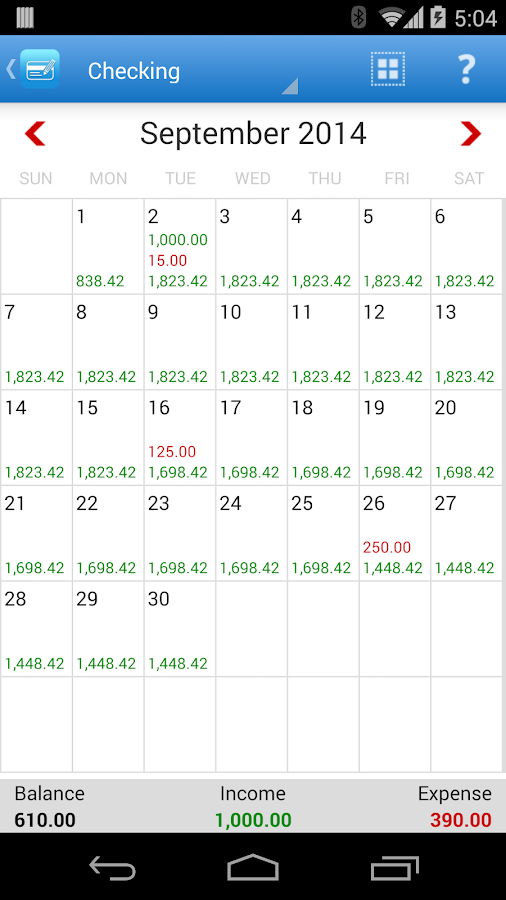
Looking for an expense and budget tool? Stop searching. Expense Manager is simple, intuitive, stable and feature-rich app that is just designed for you. Everything you need at your fingertips to manage the expenditures and budgets.
100% FREE – full features, no hidden charges or in-app purchases
Expense manager has the following great features:
• Tracking expenses and incomes by week, month and year as well as by categories
• Multiple accounts in multiple currencies
• Schedule the payments and recurring payments
• Take a picture of receipt
• Payment alerts
• Budget by day, week, month and year
• Search and reports
• Import and export account activities in CSV for desktop software
• User chooses to auto backup on Dropbox, Google Drive and SD Card backup
• Customize expense categories, payer/payer, payment methods, date format, white or black background, button style etc
• Account transfer
• Auto fill
• Convenient tools such calculator, currency converter, tip calculator, sales and tax calculator and credit card calculator
• Charts
• Developer support
PERMISSIONS EXPLANATION:
Internet Access is used to retrieve currency exchange rate.
Camera permission is used to take picture of receipt.
Account permission is used to for Google Drive data backup
All data is saved on your phone or your Dropbox account. Nobody but you can access your account.

WEB PAGE :
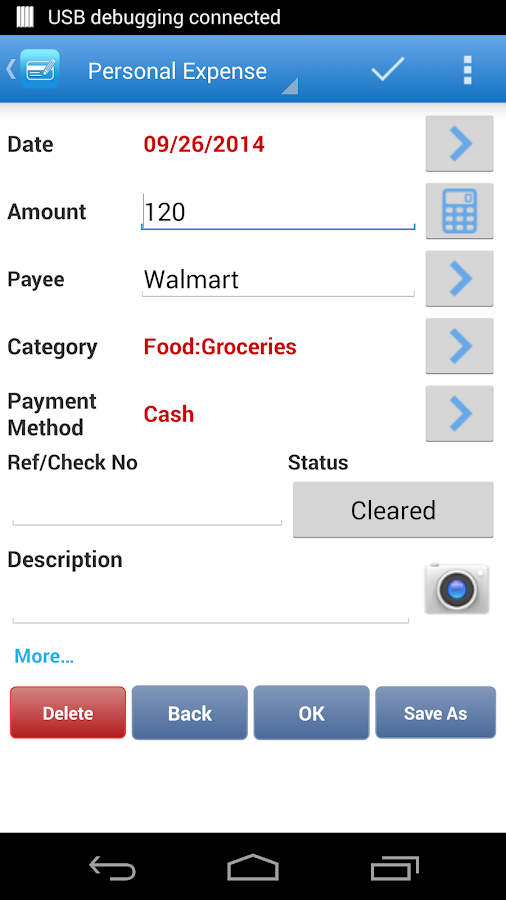
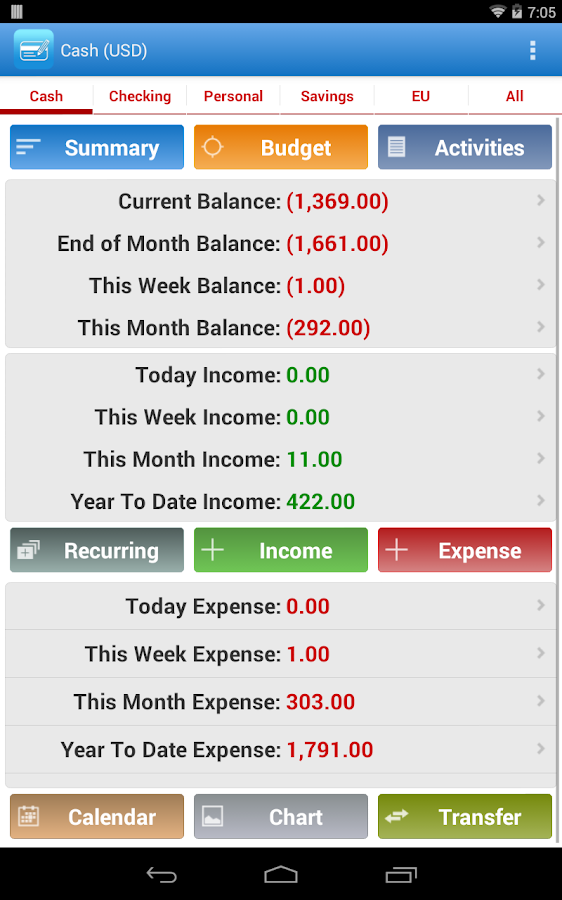
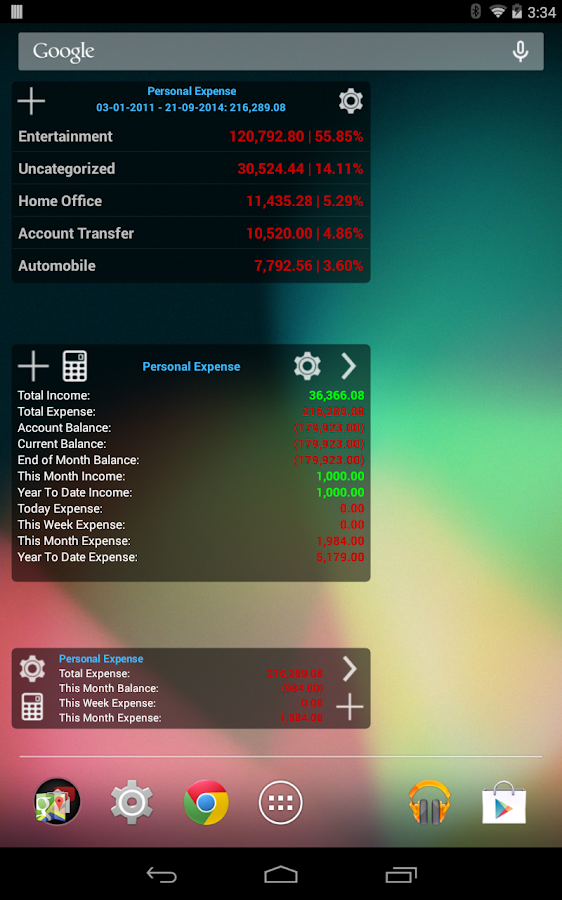
Expense Manager - screenshot


Expense Manager - screenshot


Expense Manager - screenshot


Expense Manager - screenshot


Developer


Your requirements on information technology simple solutions are always welcome. Do send your email anytime. 

We Would be happy to connect and provide you relevant information and research guidance. 

Your review information input and feedback is most Valuable to our team..


We at Usefull Resources Team Wish you Continued Happiness, Good health, Business growth and prosperity.


(( INSPIRE, LEARN, SHARE )) 


(( Every Moment Is an Opportunity ))


Sunday, April 19, 2015

Making Company advertisement Video file information : Audio Video Mix and file Creation and publishing sharing on youtube platform

(( INSPIRE, LEARN, SHARE )) 


(( Every Moment Is an Opportunity ))


Making You tube advertisement file : Audio Video Mix and file Creation with transitions and effects Title and captions. 

Easy Simple Free for all


Windows Live Movie Maker


Windows live Movie Maker is a free, simple easy to use Your very own movie studio From Microsoft.

It offers the ability to create and edit videos as well as to publish them on OneDrive, Facebook, YouTube, and Flickr.

Mother and son looking at tablet together


Download the Freeware Software from their web page :
http://windows.microsoft.com/en-in/windows-live/movie-maker


Windows Live Movie Maker logo.png

Effects and transitions

Windows Movie Maker supports a large variety of titles, effects and transitions.
  • Titles are animated text screens, normally placed at the beginning or end of the movie, but can also be placed over video clips. Titles and credits can be added as stand alone titles or overlaying them on the clip by adding them onto the selected clip. Titles range from static (non-animated) titles to fly in, fading, news banner, or spinning newspaper animations. They can also be placed on video clips to create sub-titles.
  • Transitions affect how one video clips flows into another. Example include fade and dissolve, but many more spectacular transitions are available.
  • Effects alter how a video clip appears. Example include allowing control of brightness, contrast or hue, but other more dramatic effects are available, such as giving an 'old time' flickering black and white feel.
Versions 2.x includes 60 transitions, 37 effects, 34 title and 9 credits animations. The Windows Vista version includes a different set of transitions, effects and title/credits animations while dropping a few older ones. There are in all 49 effects and 63 transitions. They are applied by using a drag and drop interface from the effects or transitions folders.

Import and edit slide shows and videos
To make a movie with Movie Maker, you’ll need some photos and videos on your PC. Import photos and videos from your phone or other device to get started.

Edit your movies and choose a theme
Trim it, split it, speed it up or slow it down: learn more about the different ways you can edit your movies. You can also choose a theme to express your unique style.

Add and edit audio
Bring your movie to life with a soundtrack that you can edit yourself.

Share your movie online
When your movie’s done, publish it to the web so you can share it with family and friends.


Once the file is created it can publish the file upload on the youtube Web page.

We have created many company videos using this freeware software and can be seen on the Youtube channel :


FOR BACKGROUND MUSIC PLAYLIST MP3 COLLECTION DO VISIT OUR WEB PAGE :

II Welcome II

Your requirements on information technology simple solutions are always welcome. Do send your email anytime. 

We Would be happy to connect and provide you relevant information and research guidance. 

Your review information input and feedback is most Valuable to our team..


We at Usefull Resources Team Wish you Continued Happiness, Good health, Business growth and prosperity.


(( INSPIRE, LEARN, SHARE )) 


(( Every Moment Is an Opportunity ))


THANK YOU


Sunday, March 22, 2015

Easy to Use Point of Sale Software PLEXIS Touch Screen

(( INSPIRE, LEARN, SHARE )) 


(( Every Moment Is an Opportunity ))


II Namaste II
Greetings

Easy to Use Point of Sale Software - Touch Screen - Mouse - Keyboard - Barcode Scanner - Weight Scale.

Welcome to Free POS Software Demo Download for your Review.
Every Single Feature and Function is enabled in this Free Trial.


Configuration for the price and products information customization in the demo version can be done and then the settings files can be transferred to the full version later.

The point of sale software systems can be downloaded from the web page :


Review video on the customized Display of the point of sale on:


Your requirements on information technology simple solutions are always welcome. Do send your email anytime. 

We Would be happy to connect and provide you relevant information and research guidance. 

Your review information input and feedback is most Valuable to our team..


We at Usefull Resources Team Wish you Continued Happiness, Good health, Business growth and prosperity.


(( INSPIRE, LEARN, SHARE )) 


(( Every Moment Is an Opportunity ))


Sunday, March 1, 2015

SIMPLE NEW EASY WIFI WIRELESS NETWORK SOLUTIONS FOR ALL

SIMPLE NEW EASY TO USE BETTER WIFI WIRELESS NETWORK SOLUTIONS FOR ALL 


4ipnet offers organizations affordable, comprehensive and effective WLAN solutions to meet evolving capacity and performance demands while reducing total cost of ownership. Our mission is to strive for excellence in our products while building strong, lifelong relationships with our customers and partners.

Key Facts

Founded in 2002, 4ipnet is a global wireless network infrastructure provider for manageable, reliable and secure Wi-Fi access. Our comprehensive product portfolio includes wireless LAN controllers, access points, hotspot gateways and switches.
Every 4ipnet product is designed with an aim to seamlessly unify wireless and wired network access for all types of public Wi-Fi settings, ranging from small-sized hotels to large-scale enterprises. In an increasingly mobile-centric and data-driven environment, 4ipnet offers organizations affordable,comprehensive and effective WLAN solutions to meet evolving capacity and performance demands while reducing total cost of ownership.


https://www.youtube.com/watch?v=TRUHPvQ_LRc


INTRODUCTION

As Internet usage continues to become more mobile, customers have an increasing expectation for wireless Internet access at public locations, such as in coffee shops, restaurants, hotel lobbies, convention centers, or airport terminals.
Whether thinking of running a hotspot for free or for a fee, shop owners and small businesses will need a hotspot management system to maintain quality of service for their customers, eliminate free-riders, and keep the network secure. 4ipnet Wireless Ticket Generator Set 2 (WTG2), consisting of SDS200W Wireless Smart Device Server and PRT200 POS Printer, is able to provide the easy hotspot solution that turns a venue instantly into a managed, branded, and moneymaking hotspot.
The WTG2 is a simpler way to serve Wi-Fi in hotspot areas. Designed to support account generation, the keypad-based SDS200W triggers the built-in on-demand billing plan(s) inside 4ipnet WHG Wireless LAN Controllers or HSG Hotspot Gateways, and then prints tickets with the PRT200. Each WHG or HSG can simultaneously support multiple WTG2, making it convenient to provide wireless tickets for guests in different locations.
Another major highlight is that the WTG2 supports QR Code Auto-Login. This unique feature allows guests to login automatically by using mobile devices to scan the QR Code printed on the PRT200's tickets. In addition to the QR Code, information on the printed tickets can be easily customized on the WHG or HSG according to an operator's needs. With the WTG2, creating Wi-Fi accounts and logging in is made much simpler.


If you find this information useful do send us your comments.

Your feedback is very valuable .

Do Share this information as it may be useful to others.


(( INSPIRE, LEARN, SHARE )) 


(( Every Moment Is an Opportunity ))


If you need any solutions or information do send us your email.